







Tech Minutes
Quick Tip - Generate a Sum or Average in Excel 2010
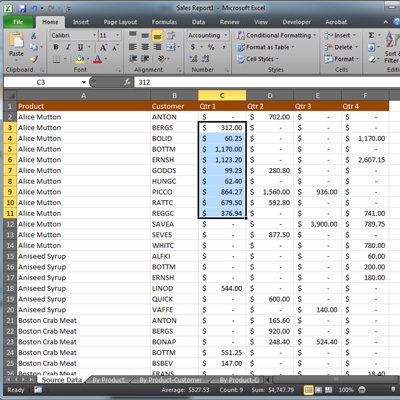
Microsoft's Excel may look daunting, but it can be incredibly useful for presenting and organizing massive amounts of data. While it is capable of letting you put together advanced formulas, much of the time it's just nice to see a sum of a column of figures.
Let's say you have a spreadsheet document with a few rows of figures. Select those adjacent cells by highlighting them. Look on the bottom of the window in the status bar. It will display the average of all of the combined numbers, number of figures you have selected, and the sum of those numbers. Try that out next time you need to add up expenses or other finances! Need help taking advantage of the productivity tools you use each day for your business? Contact Directive at 607.433.2200 and talk to us about the software we can support and help your staff with!
About the author

Related Posts
Comments

